Link in a Maze
A video game built in Processing
During my first semester at Georgia Tech, I took an interactive prototyping class covering interactive UIs and physical prototyping with Arduino. The first half focused on software prototyping using the Processing library and IDE to build UIs with various kinds of interactivity.
For the final project of that section, we were asked to create a video game playable on a PC, to spec:
- Three levels of progressing difficulty
- At least one image and one sound file, via the PImage and Minim libraries
- Some scoring system
- Playable through both keyboard and mouse
01 Link in a Maze
Although I don't identify as a gamer, my favorite games would have to be the Legend of Zelda series — so I made my own version, designing my own little take on Link, the main character. In my game, Link must collect the three pieces of the TriForce — small triangles at the end of a maze — with extra challenges and point opportunities added in the later levels.
02 The maze environment
Implementing the maze was the hardest part, because of how Processing treats lines. There are built-in functions to draw lines, but lines are collections of pixels, not objects — so I had to implement my own collision detection.
I started by drawing the maze by hand on graph paper and identifying the endpoints of each line. Processing treats the display like a cartesian plane where each point is a pixel, so while coding each line I flagged which pixels were "wall pixels" in a separate boolean array, then used that to detect whether Link was within a certain distance of any wall pixel.
Most online algorithms continuously check whether the character crosses each line along the x- and y-axes — hugely inefficient given how many lines a maze has. My implementation used four simple IF statements: one for each direction Link could move.
03 The three levels
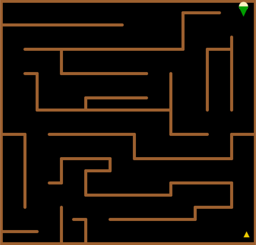
Level 1 — No additional tasks. The user simply navigates the path through the maze to collect the piece of TriForce in the bottom-right corner, moving Link with the directional keys.
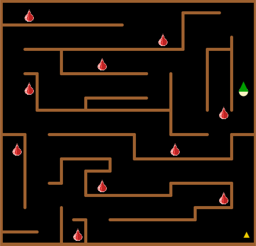
Level 2 — Collecting ChuChu jellies. Link can collect jellies along his path to increase his score, just by walking into them — much like collecting objects in the original games. He must then reach the second TriForce piece to advance. I used jelly images from the original games and a bell sound to signal a pickup (references credited in my submitted documentation).
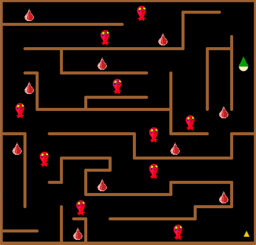
Level 3 — Fighting ChuChu monsters. The final level adds ChuChu monster enemies. To attack one, the user presses SHIFT to draw Link's sword and strikes the monster on the head. Getting too close costs points; landing a strike earns them.
04 End-to-end gameplay
Here's sample gameplay across all three levels: